

The Anatomy of a Database Scaling Crisis
When a SaaS platform transitions from a few hundred beta users to thousands of active enterprise accounts, database behavior undergoes a non-linear phase transition. In development and early production, tables contain only a few thousand rows; the database engine can perform full table sequential scans in under 5 milliseconds, hiding missing indexes and inefficient ORM queries.
However, when core multi-tenant tables (such as orders, audit_events, or messages) surpass 50 million rows, three compounding problems emerge:
- Random I/O Thrashing: Missing compound indexes force the database engine to sweep gigabytes of raw table heap pages off disk, evicting frequently accessed data from memory (PostgreSQL
shared_buffers). - Connection Starvation: Spikes in traffic spawn hundreds of serverless Lambdas or web worker threads, each opening a dedicated TCP connection that forks an operating system process, exhausting memory and stalling CPU cores in kernel context-switching loops.
- The ORM N+1 Cascade: Rapidly written Object-Relational Mapping (ORM) code executes hundreds of sequential queries inside loops, turning what should be a single 10ms bulk fetch into a 3-second database siege.
Resolving these bottlenecks without resorting to expensive database instance upscaling requires mastering the PostgreSQL cost-based query planner.
Deconstructing Query Execution Plans with EXPLAIN ANALYZE
The single most powerful diagnostic tool in relational database engineering is EXPLAIN (ANALYZE, BUFFERS, VERBOSE). Rather than guessing why a query is slow, EXPLAIN reveals the exact physical execution tree chosen by the query optimizer.
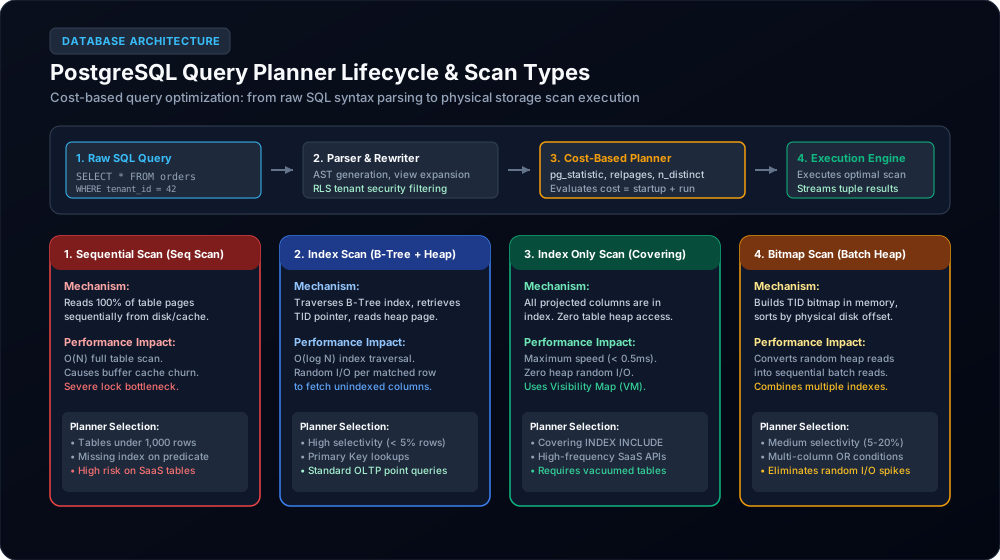
As illustrated in Figure 1, the cost-based optimizer evaluates statistical metadata stored in pg_statistic (tuple counts, distinct value estimates, and physical disk page layouts) to choose among four fundamental scan strategies:
1. Sequential Scan (Seq Scan)
The database reads every block in the table sequentially from start to finish. On a table with 20 million rows, this requires reading hundreds of thousands of 8KB disk blocks. While acceptable on small lookup tables (< 1,000 rows), a sequential scan on a multi-tenant production table is a critical performance bug.
2. Index Scan (Index Scan)
The engine traverses a B-tree index to locate matching Tuple IDs (TIDs), and then makes random physical I/O jumps to the table heap to fetch the actual row columns. It is exceptionally fast for highly selective filters (e.g., fetching a single row by primary key), but when a query matches thousands of rows, random heap reads degrade performance.
3. Index Only Scan (Index Only Scan)
The holy grail of OLTP database performance. If every column requested in the SELECT and WHERE clauses exists directly within the index, the database reads 100% of the data from the compact B-tree leaf pages and never visits the table heap at all. Combined with a clean Visibility Map (maintained by autovacuum), execution latencies frequently drop below 0.5 milliseconds.
4. Bitmap Index Scan (Bitmap Heap Scan)
When a query matches a moderate percentage of the table (e.g., 5% to 20%), random I/O from an Index Scan would be too slow. The engine first scans the index, constructs an in-memory bitmap of physical table block offsets, sorts them sequentially, and then sweeps the heap in physical disk order, converting chaotic random reads into efficient sequential batch I/O.
Multi-Tenant B-Tree Indexing Strategies
In multi-tenant SaaS architectures, almost every query includes a tenant_id predicate. However, simply adding a single-column index on tenant_id is insufficient; an enterprise customer may have 500,000 records within that single tenant.
1. The Composite Index Left-Prefix Rule
To optimize common filtering and sorting queries, build composite (multi-column) B-tree indexes where column order strictly mirrors query selectivity:
-- OPTIMAL MULTI-TENANT COMPOSITE INDEX
-- Supports: WHERE tenant_id = 42 AND status = 'active' ORDER BY created_at DESC
CREATE INDEX idx_orders_tenant_status_created
ON orders (tenant_id, status, created_at DESC);
The Rule of Equality First, Range Second: Place equality filter columns (tenant_id = 42, status = 'active') first in the index definition, followed by range or sorting columns (created_at > '2026-01-01'). Once the B-tree encounters a range predicate, subsequent columns in the index cannot be used for binary tree traversal.
2. Partial Indexes for Active Working Sets
In SaaS workflows, 90% of user queries target "active" or "unarchived" data, while 90% of the physical table consists of historical or soft-deleted records. Instead of indexing millions of inactive rows, use a partial index:
-- PARTIAL INDEX: Only indexes rows that matter to live OLTP APIs
CREATE INDEX idx_active_tasks_tenant_due
ON tasks (tenant_id, due_date)
WHERE status != 'completed' AND deleted_at IS NULL;
A partial index is typically 80% smaller than a full-table index, fits entirely within RAM (buffer cache), and adds zero write overhead when updating completed or archived tasks.
3. Covering Indexes with the INCLUDE Clause
Introduced in PostgreSQL 11, the INCLUDE clause allows non-key payload columns to be stored directly in the index leaf pages without participating in the B-tree sorting tree:
-- COVERING INDEX: Enables pure Index Only Scans
CREATE INDEX idx_users_tenant_email_covering
ON users (tenant_id, email)
INCLUDE (id, first_name, role);
When an API endpoint executes SELECT id, first_name, role FROM users WHERE tenant_id = $1 AND email = $2, PostgreSQL fetches the entire result from the index, eliminating 100% of table heap page lookups.
Connection Pooling: Direct Postgres vs. PgBouncer
One of the most dangerous architectural misconceptions among developers transitioning to cloud-native microservices is assuming PostgreSQL handles connections like Node.js or Redis. It does not.
PostgreSQL uses a process-per-connection architecture. Every client connection spawns a dedicated Linux operating system process that consumes approximately 10MB of RAM and requires its own memory arenas for sorting and hashing (work_mem). When hundreds of container pods or serverless functions connect directly, the database server collapses under memory exhaustion and extreme CPU context switching.
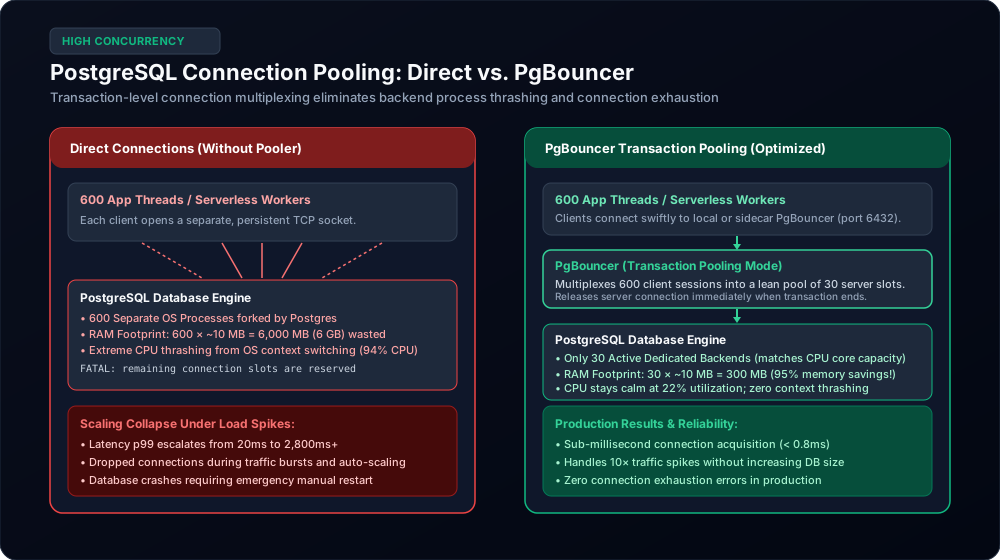
As demonstrated in Figure 2, inserting PgBouncer in front of PostgreSQL provides transformative stability:
- Transaction Pooling Mode: PgBouncer holds a persistent pool of dedicated server connections (e.g., 30 connections matching the CPU core count). When an application thread issues a query, PgBouncer assigns a server connection only for the precise duration of the transaction, immediately returning it to the shared pool when the transaction commits.
- Massive Concurrency with Near-Zero Overhead: 600 concurrent application threads can be served effortlessly by 30 backend connections. Memory footprint drops from 6,000 MB (6 GB) to 300 MB, and database CPU drops from 94% down to 22%.
- Handling Prepared Statements: Because transaction pooling reassigns server connections between transactions, standard named prepared statements can collide. High-performance teams configure PgBouncer with
pool_mode = transactionand use unnamed prepared statements or ORM protocol-level parameters.
Caching Architecture: Cache-Aside & Stampede Prevention
The fastest database query is the one that never touches the database. For read-heavy SaaS applications, implementing a distributed caching layer (Redis) using the Cache-Aside Pattern is mandatory:
async function getTenantSettings(tenantId) {
  const cacheKey = `tenant:${tenantId}:settings`;

  // 1. Attempt to fetch from Redis
  const cached = await redis.get(cacheKey);
  if (cached) return JSON.parse(cached);

  // 2. Cache miss: Query primary database
  const settings = await db.query(
    'SELECT * FROM tenant_settings WHERE tenant_id = $1',
    [tenantId]
  );

  // 3. Write back to Redis with a jittered TTL (e.g., 300s +/- 30s)
  const ttl = 300 + Math.floor(Math.random() * 60);
  await redis.setex(cacheKey, ttl, JSON.stringify(settings.rows[0]));

  return settings.rows[0];
}TTL = 300 + rand(0, 60)) so keys do not expire simultaneously, or use a distributed mutex lock / stale-while-revalidate background refresh.
SaaS Database Bottleneck & Remediation Matrix
When investigating database latency, use the priority matrix below to diagnose telemetry signals and execute targeted engineering fixes:
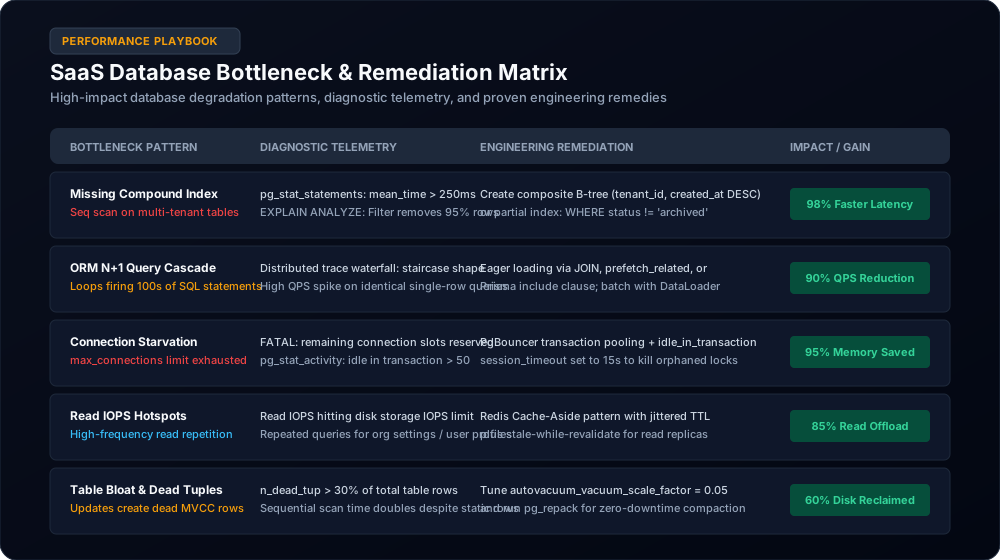
| Bottleneck Pattern | Diagnostic Telemetry | Root Cause | Engineering Remediation |
|---|---|---|---|
| Missing Compound Index | pg_stat_statements mean_exec_time > 250ms; high CPU |
Full table sequential scan on multi-tenant table | Create composite B-tree (tenant_id, created_at DESC) or partial index |
| ORM N+1 Query Cascade | APM trace waterfalls showing 100+ identical SQL queries | Loop in application code making sequential single-row queries | Eager load via JOIN, Django prefetch_related, or Prisma include |
| Connection Starvation | FATAL: remaining connection slots reserved |
Application threads exceeding max_connections |
Deploy PgBouncer in transaction pooling mode; set client timeouts |
| Read IOPS Hotspots | Database read IOPS hitting cloud disk limits (AWS gp3/io2) | Repeated high-frequency reads for organizational settings | Implement Redis Cache-Aside with jittered TTL and read replicas |
| Table Bloat & Dead Tuples | Slow scans despite valid indexes; high disk consumption | High-frequency UPDATE/DELETE statements creating dead MVCC rows |
Tune autovacuum_vacuum_scale_factor = 0.05 and run zero-downtime pg_repack |
8-Step Database Optimization Checklist
Before considering costly database hardware upscaling, ensure your engineering team has executed these eight foundational optimizations:
- Enable
pg_stat_statements: Track every query's execution count, total execution time, mean latency, and buffer hits. Identify the top 5 queries consuming 80% of database CPU. - Eliminate Unindexed Foreign Keys: Ensure every foreign key column has an index; missing foreign key indexes cause full table locks during parent row deletions.
- Configure Statement Timeouts: Set
statement_timeout = '15s'to automatically terminate rogue runaway queries before they monopolize database locks and exhaust worker pools. - Tune Memory Parameters: Review default cloud provider settings. Adjust
shared_buffersto 25% of total system RAM, and setwork_memappropriately for complex sorting operations. - Deploy Connection Pooling: Install PgBouncer or AWS RDS Proxy between application microservices and the database engine. Enforce transaction pooling mode.
- Aggressive Autovacuum Tuning: Lower
autovacuum_vacuum_scale_factorfrom the default 0.20 to 0.05 on large tables so dead tuples are cleaned up before table bloat degrades query latency. - Audit ORM Queries in Staging: Run integration tests with SQL query logging enabled. Enforce static analysis rules that detect unindexed queries and N+1 loops before pull requests merge.
- Implement Read Replicas for Analytics: Offload heavy background reporting, CSV exports, and BI dashboards to asynchronous read replicas, isolating production OLTP transactions.
Authoritative Engineering Sources & Further Reading
- PostgreSQL Global Development Group: Performance Tips & Using EXPLAIN
- Markus Winand: Use The Index, Luke! A Guide to Database Performance for Developers
- PgBouncer Project: PgBouncer Architecture & Pool Modes
- Baron Schwartz et al.: High Performance MySQL: Optimization, Backups, and Replication (O'Reilly Media)
Is Your SaaS Database Struggling Under Load?
Before you spend thousands on bigger database instances, let our database architects optimize your query plans, indexing strategies, and connection pooling architectures for maximum throughput.