
Who This Guide Is For
This analysis is written for operations directors, technical founders, and product leaders managing core business processes across sprawling spreadsheets. If your team spends several hours each Monday manually reconciling multiple CSV exports, resolving formula corruption errors, or emailing workbooks titled Master_Operations_Final_v3_Oct2026.xlsx, your business has hit the mathematical and structural boundaries of spreadsheet scalability.
The Core Problem: How Spreadsheets Create Operational Fragility
Spreadsheets fail in production not because they lack calculation capability, but because their fundamental computing model couples presentation, business logic, and database storage into an unversioned two-dimensional grid. In software engineering, this is known as a severe violation of the separation of concerns.
When businesses expand their transaction volumes and operational complexity, four distinct failure modes predictably emerge:
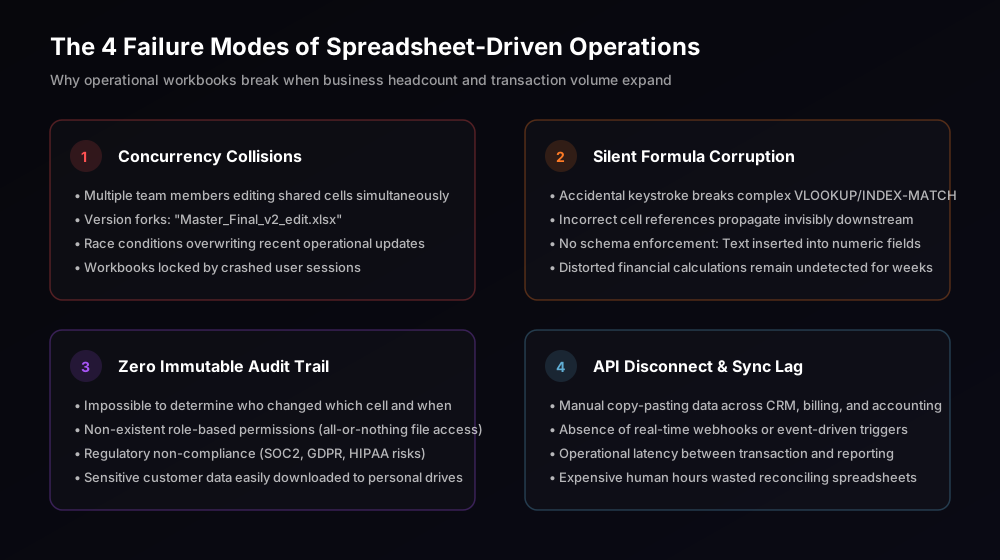
1. Concurrency Collisions
Spreadsheet software utilizes file-level or coarse row-level locking. When 10 team members update shift rosters, client inventory, or billing statuses simultaneously, race conditions inevitably overwrite recent edits without warning.
2. Silent Formula Corruption
Without strict data typing, an accidental text entry in a numeric column silently turns #VALUE! into bad aggregations. Complex nested VLOOKUP or INDEX/MATCH statements break invisibly, corrupting executive metrics for weeks before discovery.
3. Zero Immutable Audit Logs
Spreadsheets offer primitive revision histories that cannot answer regulatory compliance inquiries: Who modified invoice line 412? What was the previous price? Why was this discount applied? Lack of immutable logging exposes companies to compliance and fraud risks.
4. API Disconnect & Sync Lag
Spreadsheets cannot act as reliable event-driven message brokers. Connecting an Excel sheet to billing gateways or CRMs via brittle third-party zaps triggers rate-limit exceptions, duplicate entries, and expensive human reconciliation overhead.
Decision Framework: When to Stay in Excel vs. When to Build Custom Software
Custom software engineering requires capital allocation, architectural discovery, and disciplined implementation. You should not replace every spreadsheet with custom code. Knowing when to keep a spreadsheet and when to engineer proprietary software requires an objective technical decision matrix:
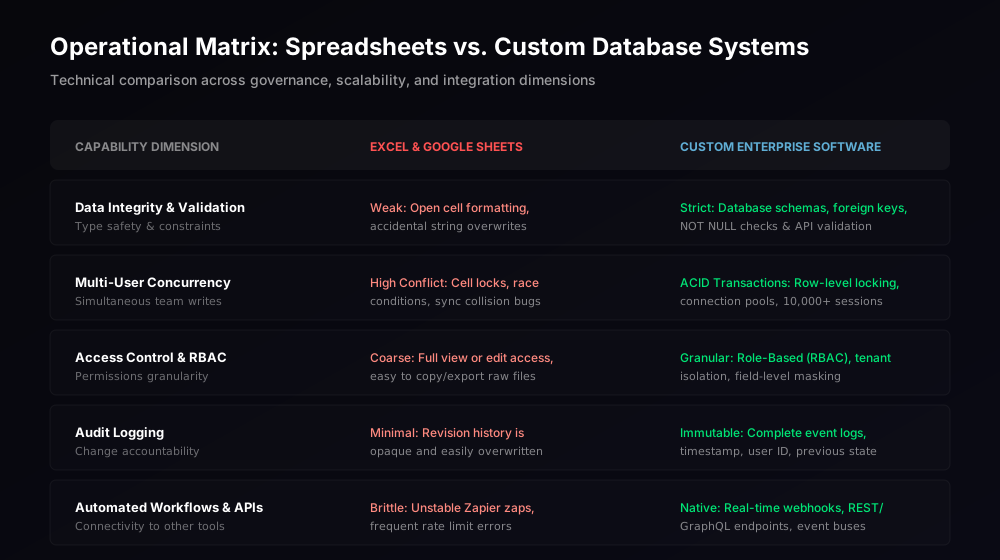
When to Keep Spreadsheets:
- Exploratory Financial Modeling: Ad-hoc cash flow simulations, venture capital cap table modeling, and one-off corporate strategy scenarios with a single author.
- Early Discovery & Validation: Testing a brand-new service workflow before the operational schema has stabilized. If your data structure changes daily, code is premature.
- Departmental Scratchpads: Personal task lists and temporary calculations that do not touch production customer data or core accounting.
When Custom Software Is Structurally Mandatory:
- Multi-User Concurrency (>5 Daily Editors): Operations where customer reps, warehouse staff, and managers must record transactions simultaneously without locking each other out.
- Granular Role-Based Access Control (RBAC): When junior employees should only see assigned tasks, managers can approve payouts, and client stakeholders view sanitized status portals. Spreadsheets offer zero native field-level access governance.
- Relational Data Complexity: When operations involve many-to-many relationships (e.g., customers have multiple orders, orders contain multiple items, items are distributed across multiple vendors). Flatted workbook grids cannot model relational integrity without severe data duplication.
- Mission-Critical Event Triggers: When an operational update must instantly trigger an automated WhatsApp notification, dispatch an email receipt, update an ERP ledger, or charge a credit card.
The Production Software Architecture: What Replaces the Workbook?
Transitioning from a workbook to custom software is not merely about writing code; it is about building a clean, modern three-tier application architecture. At Ramaaya Technologies, our Software Engineering practice designs scalable web architectures that guarantee ACID transactions, security isolation, and sub-second query execution.
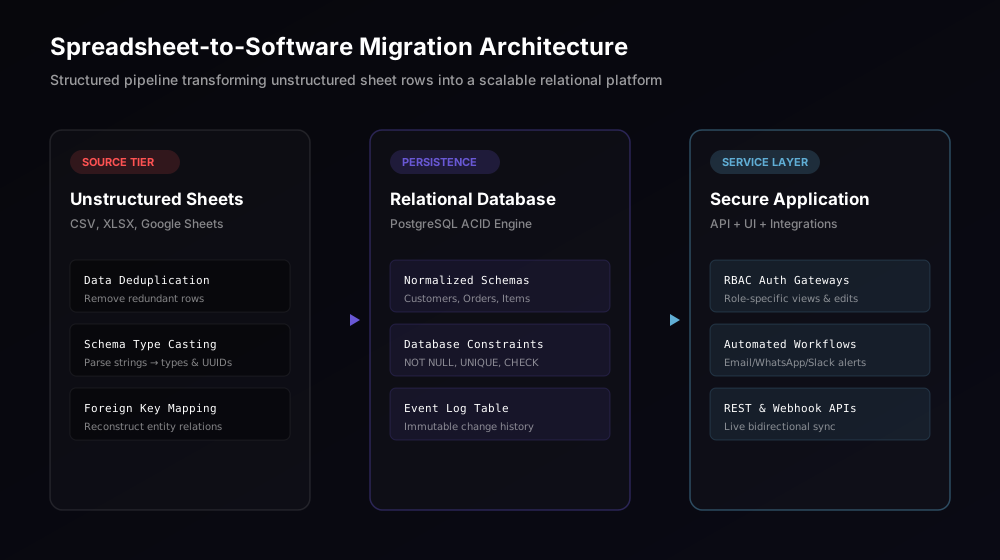
1. Persistence Tier (Relational PostgreSQL Engine)
The flat spreadsheet table is decomposed into third normal form (3NF) relational tables. Entities such as tenants, users, orders, and inventory_items receive immutable primary keys (UUIDv4) and strict foreign key constraints. PostgreSQL provides ACID (Atomicity, Consistency, Isolation, Durability) transactions, ensuring that if an order process fails midway, the database cleanly rolls back rather than leaving corrupted partial entries.
2. Application & API Validation Tier
Instead of cell formulas that can be deleted by accident, business logic is encapsulated in server-side API services (Node.js/Express, Python/FastAPI, or Go). Strict JSON schema validation libraries (such as Zod) enforce data typing before queries touch the database. Role-Based Access Control (RBAC) middleware inspects user tokens, ensuring that financial line items cannot be modified by non-administrative accounts.
3. Reactive User Interface Tier
The user interface replaces chaotic grid views with role-tailored dashboards. Operations managers receive high-velocity filtering interfaces, warehouse staff receive mobile-optimized barcode scanning portals, and external clients access read-only status tracking pages. Built on React and modern CSS design tokens, users enjoy spreadsheet-like speed without the risk of breaking underlying database models.
Practical Implementation: The 5-Phase Migration Blueprint
Replacing an active spreadsheet system without halting ongoing operations requires a disciplined execution lifecycle:
- Entity & Formula Extraction Audit: Map every sheet tab, identify hidden formulas, locate circular references, and list all third-party tools that currently import or export from the workbook.
- Relational Schema Design: Translate tabular rows into clean Entity Relationship Diagrams (ERDs). Define primary keys, foreign relations, enum types, and audit logging tables.
- Data Sanitization & Automated ETL: Write reproducible extraction scripts (Python/Pandas) that parse legacy sheet data, fix corrupted string formatting, cast values into strict data types, and load historical records into the staging database.
- Bespoke Web Platform Engineering: Construct the secure API layer, administrative portals, real-time webhooks, and role-tailored views.
- Dual-Write Parallel Run & Cutover: Run the new custom platform alongside the spreadsheet for 14 operational days to verify ledger parity down to the cent, followed by decommissioning the spreadsheet to prevent dual-source divergence.
Common Mistakes When Migrating Spreadsheets to Software
- Replicating Excel Exactly in the UI: Trying to build an exact clone of an Excel grid inside a web browser often preserves the exact usability flaws of the original workbook. Build task-oriented forms and contextual workflows instead.
- Skipping Historical Data Sanitization: Importing historical sheets directly without automated validation scripts results in loading years of dirty, misspelled data into strict relational database constraints, triggering deployment halts.
- Failing to Define Strict Access Roles Early: Delaying the definition of permission boundaries leads to cumbersome post-launch refactoring. Lock down user permissions in the initial architectural discovery phase.
The Ramaaya Perspective: Enterprise Equity vs. Tool Sprawl
When your business runs on spreadsheets, your operational workflow is trapped in unversioned desktop files. By migrating core operations into bespoke business software, you transform manual daily labor into proprietary digital enterprise assets. You eliminate human data entry bottlenecks, ensure total audit compliance, and create a system capable of scaling effortlessly from 500 to 5,000,000 transactions.
For fast-growing organizations evaluating architecture for multi-tenant SaaS products, explore our in-depth companion guide: B2B SaaS Multi-Tenant Database Architecture: A Practical Engineering Guide.