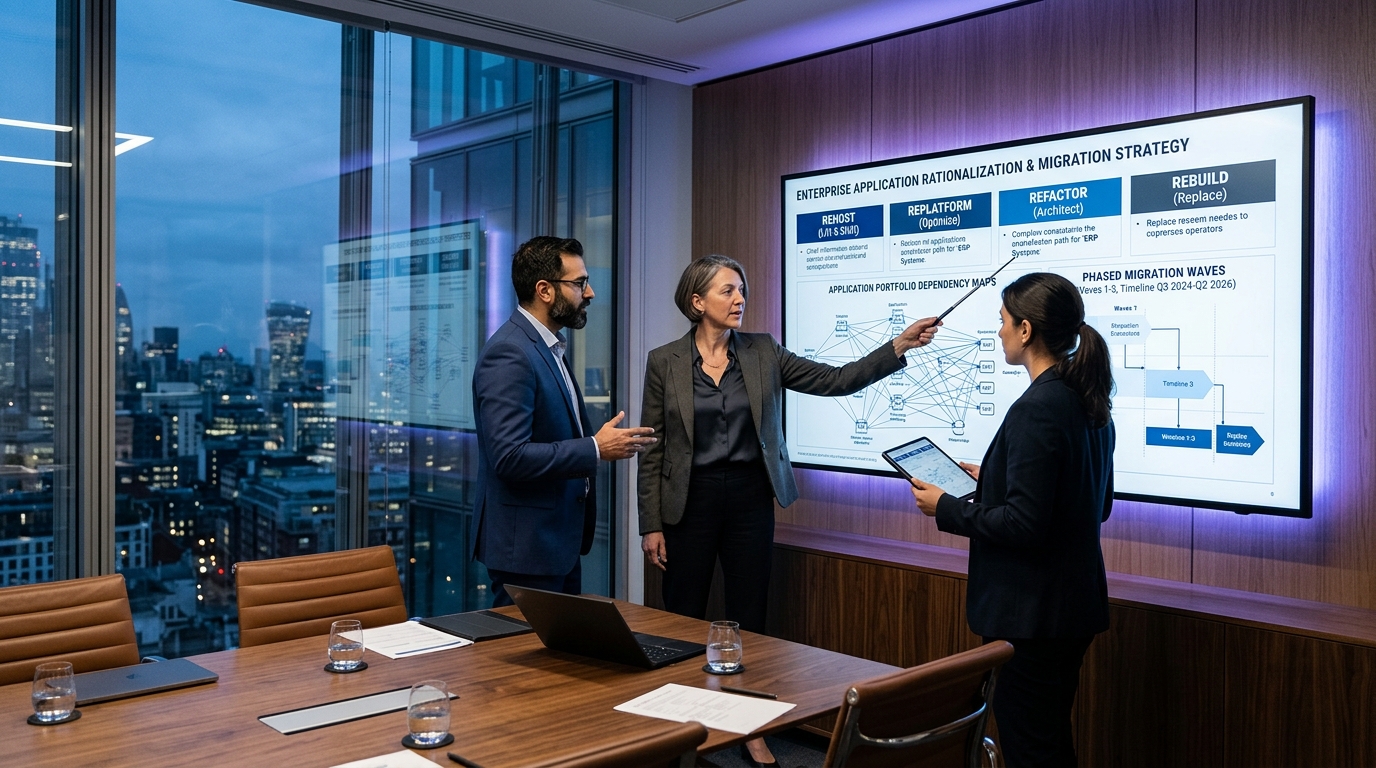
Cloud migrations are frequently sold as straightforward journeys toward immediate cost reductions and effortless scalability. Yet according to enterprise cloud benchmark data, more than 60% of initial cloud migrations exceed their projected budgets by 30% or more, and nearly half fail to unlock anticipated elasticity in their first year.
The underlying root cause is rarely the choice of cloud provider (AWS, Microsoft Azure, or Google Cloud). Rather, it is an architectural mismatch between the application portfolio and the chosen migration strategy.
When teams treat cloud migration as a binary decision — either moving everything as-is or stopping the business for two years to rewrite every line of code into serverless microservices — they inevitably incur either runaway operational infrastructure bills or crippling multi-year delivery delays.
In this guide, we break down the classic 7 Rs migration framework popularized by AWS Prescriptive Guidance and the Microsoft Azure Cloud Adoption Framework (CAF). We examine the real-world trade-offs between Rehosting (Lift-and-Shift), Replatforming (Lift-and-Reshape), Refactoring (Cloud-Native Rearchitecture), and Rebuilding (Greenfield Rewriting), providing actionable decision trees, Total Cost of Ownership (TCO) models, and a battle-tested phased execution framework.
The 7 Rs Cloud Migration Framework Explained
Originally formalized by Gartner and expanded into industry standards by Amazon Web Services and Microsoft Azure, the 7 Rs framework classifies application migration strategies along an axis of effort, code alteration, risk, and cloud-native capability payoff.
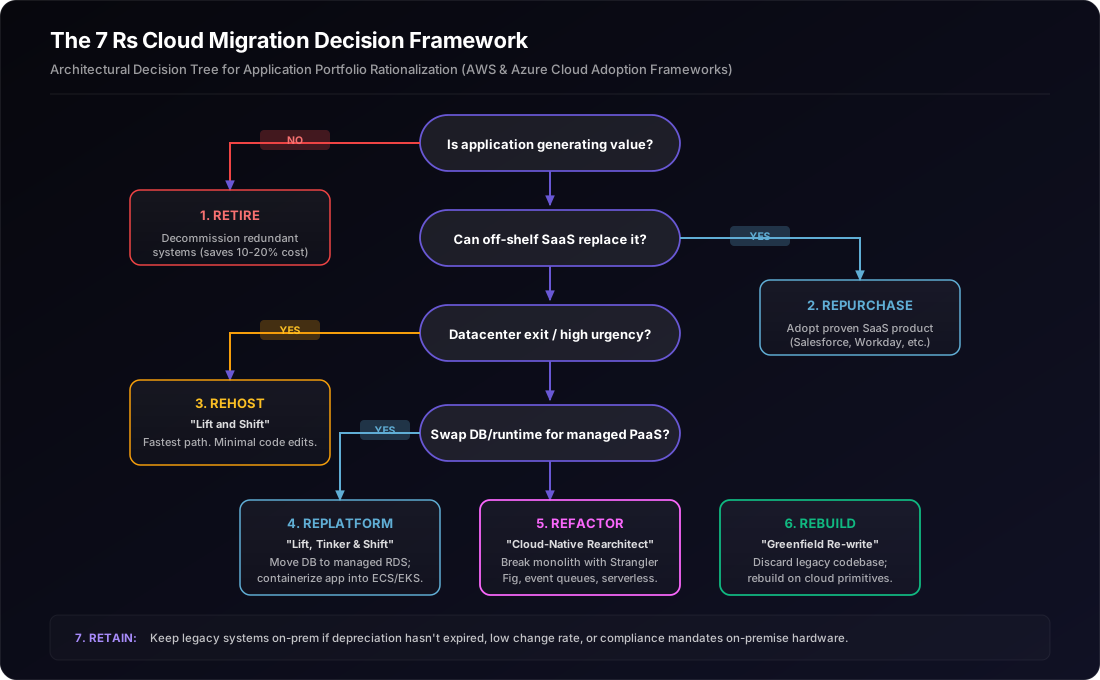
Before committing an application to a cloud migration pipeline, enterprise architects must evaluate every workload against the seven potential paths:
1. Rehost ("Lift-and-Shift")
Moving an on-premises application stack (virtual machines, guest operating systems, local file storage, and relational databases) directly to cloud infrastructure-as-a-service (IaaS) instances (e.g., AWS EC2, Azure VMs, GCP Compute Engine) without making code, configuration, or architectural alterations.
Rehosting prioritizes migration velocity and minimized operational disruption over cloud modernization.
2. Replatform ("Lift-and-Reshape")
Moving applications to the cloud while replacing specific underlying infrastructure components with managed cloud platform services (PaaS) without materially altering the application's core code or business logic.
Classic examples include moving self-hosted PostgreSQL or Microsoft SQL Server on bare metal to Amazon RDS / Azure Database for PostgreSQL, wrapping existing application binaries into Docker containers running on AWS ECS, Azure App Service, or Google Cloud Run, or offloading local NFS file shares to Amazon S3 or Azure Blob Storage.
3. Refactor / Rearchitect ("Cloud-Native")
Re-engineering the internal architecture of the application to take full advantage of cloud-native design principles: decoupling monoliths into domain services, implementing asynchronous message queues (RabbitMQ, SQS, Azure Service Bus), adopting serverless compute (AWS Lambda, Azure Functions), and replacing single-instance databases with distributed data engines.
Refactoring is driven by a strong business need for massive horizontal scalability, continuous deployment, or high fault tolerance that cannot be achieved within the legacy architecture.
4. Rebuild ("Greenfield Cloud Rewrite")
Scrapping the legacy codebase entirely and re-architecting the solution from scratch using modern cloud-native frameworks, modern programming languages (Go, TypeScript, Rust), and modern database paradigms.
While Rebuilding carries the highest initial engineering cost and longest delivery timeline, it eliminates years of accumulated technical debt and enables maximum feature velocity once completed.
5. Repurchase ("Drop-and-Shop")
Retiring an in-house or custom-licensed legacy system entirely and replacing it with a commercially available Software-as-a-Service (SaaS) platform.
Common enterprise examples include replacing legacy on-premise Exchange email with Google Workspace or Microsoft 365, replacing bespoke internal ticket systems with Jira or ServiceNow, and replacing aging custom CRM databases with Salesforce or HubSpot.
6. Retain ("Revisit / Hybrid Coexistence")
Intentionally keeping specific legacy applications in their current on-premises or co-located datacenter environment.
Retention is the correct strategic decision when applications were recently upgraded, have regulatory data residency requirements that current cloud regions cannot fulfill, have extreme microsecond-latency dependencies on on-premise hardware controllers, or lack sufficient business value to justify the migration cost.
7. Retire ("Decommission")
Permanently shutting down and archiving applications that are no longer generating business value.
In comprehensive portfolio discovery audits, engineering teams consistently discover that 10% to 20% of legacy enterprise servers are zombie instances: running cron jobs that no stakeholder reads, logging events for defunct products, or serving staging environments for abandoned initiatives. Decommissioning these assets saves substantial infrastructure spend immediately before a single byte is migrated.
The Hidden Traps of "Lift-and-Shift": Why Rehosting Often Backfires
When non-technical leadership demands an aggressive cloud deadline — such as an impending datacenter lease termination — teams frequently default to 100% Rehosting. While lift-and-shift is the fastest way to physically vacate a physical datacenter, treating it as the terminal state of cloud adoption creates severe operational and financial friction:
The Lift-and-Shift Anti-Pattern
"When you lift and shift a brittle, overprovisioned on-premises server into the cloud without architectural adjustments, you do not get a modern, resilient cloud system. You get a brittle, overprovisioned server that costs 2.5x more per month because you are paying cloud on-demand premiums for static, unelastic resource allocations."
The primary failure modes of unoptimized lift-and-shift include:
-
Carrying Overprovisioning into On-Demand Cloud Pricing: On-premises infrastructure was sized for peak capacity 5 years in advance (e.g., dual-socket 64-core physical servers with 256 GB RAM running at 8% average CPU utilization). In a datacenter where servers are a sunken capital expenditure (CapEx), low utilization is acceptable. In public cloud, running an
m6i.16xlargeinstance 24/7/365 to service 8% CPU load represents thousands of dollars of pure waste every month. - Paying Enterprise Legacy OS and Hypervisor Tax: Lifting legacy Windows Server 2012 VMs or proprietary commercial UNIX images to cloud VMs forces organizations to pay hefty license-included hourly surcharges alongside standard compute fees.
- Zero Automated Elasticity: Monolithic architectures that rely on local state, session-affinity pinned in memory, and local hard-drive caching cannot scale horizontally with Cloud Auto-Scaling Groups. They remain statically provisioned, meaning you experience all the cloud billing variability with none of the cloud resilience benefits.
- Persistent Single Points of Failure: If a legacy application runs on a single monolithic VM without distributed storage or health check failovers, moving it to an AWS EC2 instance simply relocates that single point of failure from an on-premise rack to an AWS availability zone.
Decision Framework: When to Choose Each Strategy
To determine whether an application workload should be Rehosted, Replatformed, Refactored, or Rebuilt, engineering teams must evaluate four key dimensions: Business Differentiation, Change Velocity, Technical Debt, and Cost/Timeline Constraints.
| Strategy | Best Fit Use Case | Technical Prerequisite | Expected ROI Timeline |
|---|---|---|---|
| Rehost (Lift-and-Shift) | Hard datacenter exit deadlines, legacy COTS commercial software, stable low-change systems. | Compatible x86/64 OS; minimal local hardware-locking dongles. | 3 – 6 Months (purely from datacenter facility elimination) |
| Replatform (Lift-and-Reshape) | Core business apps with high database ops overhead; applications easily containerized. | Stateless web/worker tiers; databases compatible with managed engines (RDS/Cloud SQL). | 6 – 12 Months (immediate reduction in DBA and backup overhead) |
| Refactor (Rearchitect) | High-growth digital products hitting concurrency limits; systems needing auto-scaling and CI/CD. | Clear domain boundaries; internal team familiar with cloud-native distributed architecture. | 12 – 24 Months (massive long-term feature velocity & cost scaling) |
| Rebuild (Greenfield) | Severely tangled monoliths where code debt prevents any new feature deployment; core differentiators. | Executive buy-in for multi-quarter feature freezes on legacy; clear target requirements. | 18 – 36 Months (complete elimination of technical debt) |
When Rehosting IS the Right Move
Despite its long-term cost drawbacks, Rehosting is the superior strategic choice under specific operating circumstances:
- Hard Datacenter Deadlines: When a colocation lease terminates in 90 days or an enterprise facility is being decommissioned, there is no time to rewrite code. Rehosting gets the assets off physical floorboards into cloud IaaS safely, after which modernization can occur in place.
- Third-Party Commercial Software (COTS): When running third-party licensed software whose source code you do not own, you cannot re-architect it. Rehosting is often the only permissible deployment topology supported by the vendor.
- Low-Change Utility Systems: Internal back-office tools that receive zero new feature requests and consume minimal compute do not justify a $200,000 refactoring investment. Rehosting them onto low-cost burstable instances (e.g., AWS
t4gseries) is economically optimal.
When Replatforming Strikes the Optimal Balance
For 70% of growing tech companies and mid-market organizations, Replatforming is the sweet spot of cloud migration. It captures 80% of cloud-native advantages with only 20% of the code modification effort:
- Database Modernization: Migrating an on-premises PostgreSQL cluster to Amazon RDS or Azure Database for PostgreSQL eliminates tedious tasks: automated multi-AZ failover, automated point-in-time recovery, automated minor version patching, and automated EBS snapshot management. The application connection string changes, but the SQL queries remain completely untouched.
- Containerization: Packaging existing Node.js, Python, Java, or .NET applications into Docker containers and deploying them to managed orchestrators (AWS ECS Fargate, Azure Container Apps, Google Cloud Run) unlocks declarative deployments, automated health-checking, zero-downtime rolling deploys, and horizontal auto-scaling without modifying core application business logic.
- Object Storage Offloading: Pointing file upload controllers to S3-compatible APIs rather than writing to local persistent block storage decouples server instances from local disk state, allowing web servers to scale horizontally from 1 to 50 nodes dynamically.
When Refactoring or Rebuilding is Mandatory
Attempting to migrate certain legacy applications without architectural changes is futile. Refactoring or Rebuilding is mandatory when:
- Core Revenue Driver Hitting Scalability Ceilings: If your primary SaaS platform suffers database connection pool exhaustion or unrecoverable lock contention during customer traffic spikes, simply putting it on a larger cloud VM will not solve the concurrency deadlock. The data layer must be decomposed.
- Release Cycles Have Stalled: If deploying a two-line CSS change requires compiling a 4-million-line monolithic code repo that takes 3 hours to build and risks taking down billing, the architecture must be refactored into domain-driven modular services. (See our guide on Monolith vs Microservices for Growing SaaS).
- Global Latency and Multi-Region Compliance: If enterprise customers require data residency within the European Union (GDPR) or low-latency API access across APAC, North America, and Europe, a centralized on-premises architecture cannot comply without distributed cloud-native event architectures.
The Phased Cloud Migration Lifecycle: From Discovery to Post-Cutover FinOps
Executing a cloud migration without a structured phase gate framework inevitably results in "migration chaos": missed service dependencies, unbudgeted network egress spikes, and emergency rollback scrambles.
At Ramaaya Technologies, our engineering teams follow a battle-tested 5-Stage Phased Migration Lifecycle:
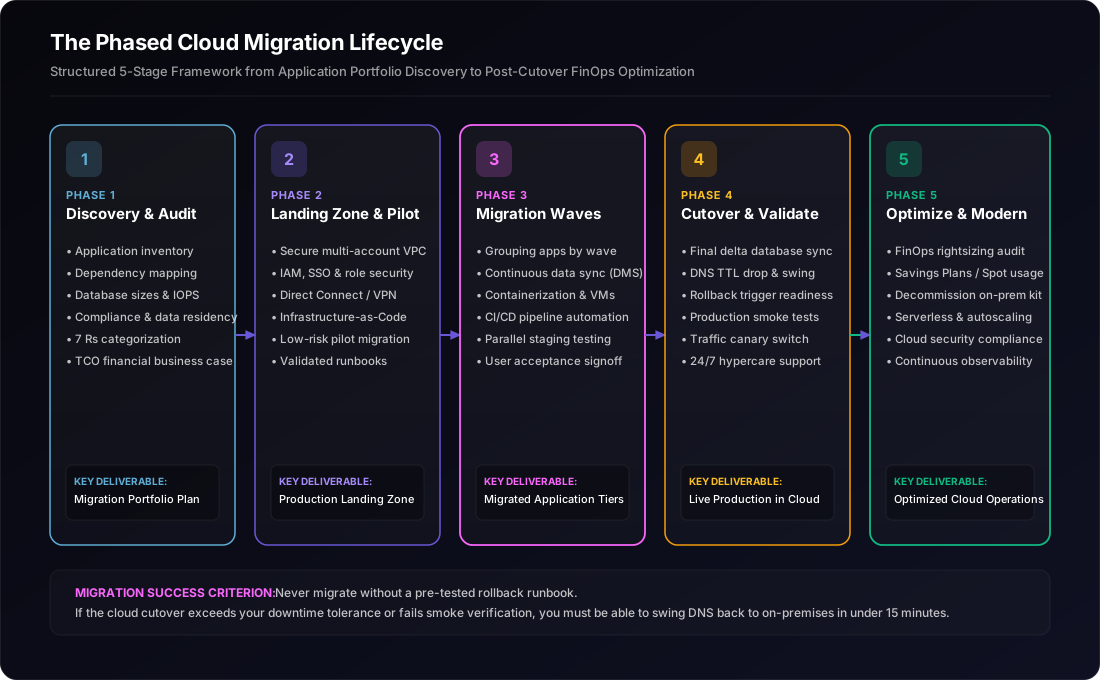
Stage 1: Application Discovery & Dependency Mapping
Deploy automated network discovery agents to catalog every physical server, virtual machine, running process, database, and internal/external API integration. Identify hidden dependencies (e.g., hardcoded IP addresses in legacy shell scripts, shared Windows SMB file mounts, third-party webhook endpoints). Categorize each application using the 7 Rs framework.
Stage 2: Cloud Landing Zone & Foundation Architecture
Before migrating a single workload, establish an enterprise-grade cloud landing zone (AWS Control Tower, Azure Landing Zones). Configure multi-account governance, identity federation (Single Sign-On with Okta/Azure AD), least-privilege IAM roles, Infrastructure as Code (Terraform), centralized security logging (CloudTrail, GuardDuty), and encrypted network topologies (Transit Gateway, VPN / Direct Connect).
Stage 3: Pilot Wave & Continuous Data Replication
Select a low-risk, non-critical application workload (e.g., an internal analytics reporting dashboard or staging environment) as the initial pilot. Test automated migration tooling (AWS Application Migration Service, Azure Migrate). Establish continuous, asynchronous change-data replication from on-premise databases to target cloud managed databases to ensure datasets remain fully synchronized without disrupting production operations.
Stage 4: Validation, Traffic Cutover & Fallback Drills
Execute comprehensive functional, performance, and security testing in the cloud environment. Conduct a dry-run dress rehearsal of cutover night with simulated traffic. On cutover day, lower DNS TTLs to 60 seconds, place on-premise applications in read-only maintenance mode, synchronize final database delta records, repoint DNS / load balancer records to the cloud endpoints, and verify end-to-end telemetry. Maintain reverse synchronization channels for 48 hours to ensure zero-risk rollback capabilities.
Stage 5: Post-Cutover Optimization & FinOps Governance
Migration does not end at cutover. In the first 30 to 90 days post-cutover, implement strict FinOps practices: right-size overprovisioned cloud compute instances based on real CloudWatch/Azure Monitor metrics, terminate stranded unattached storage volumes, configure automated storage lifecycle tiering to S3 Glacier, and purchase 1-year or 3-year Compute Savings Plans or Reserved Instances for baseline capacity. (For detailed execution, review our guide on Cloud Cost Optimization & FinOps).
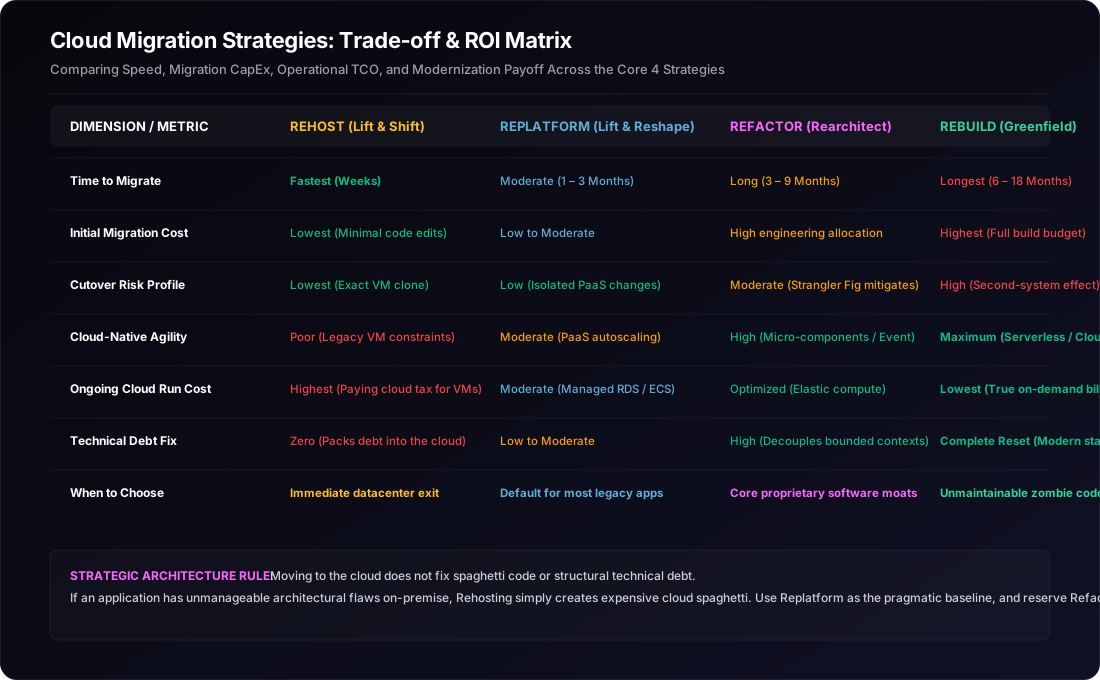
Cloud Migration Strategies: Trade-off & ROI Matrix
Every migration pathway involves distinct compromises across speed, initial engineering expenditure (CapEx), ongoing operational Total Cost of Ownership (OpEx), and business agility. The matrix below synthesizes these trade-offs to help executive decision-makers calibrate their budget and risk tolerances:
Managing Key Risks: Data Integrity, Downtime, and the Skills Gap
Regardless of which migration strategy you select, enterprise migrations carry three primary vectors of operational risk:
1. Data Loss and Sync Drift During Cutover
The biggest fear of any CTO during cutover is data corruption or lost transactions.
Mitigation: Never perform a "cold snapshot and restore" migration for active transactional databases. Use continuous Change Data Capture (CDC) replication tools like AWS Database Migration Service (DMS) or Azure Database Migration Service. Let CDC replicate writes in near-real-time for days prior to cutover. On cutover night, when the app is placed in a 2-minute maintenance window, the replication lag is mere milliseconds, ensuring zero transactional drop. (Learn more about CDC architectures in our article on Operational Data vs. Analytics Data).
2. Networking and Latency Chokepoints (The Hybrid State)
During phased multi-wave migrations, your application estate will inevitably exist in a hybrid state: Application A is running in AWS us-east-1, while Application B (its primary database dependency) remains on-premises. If network communication travels over public internet VPN with 45ms latency and inconsistent jitter, user experience will degrade instantly.
Mitigation: Establish dedicated, low-latency private interconnects (AWS Direct Connect, Azure ExpressRoute) prior to migration wave execution. Group highly interdependent services into the same migration wave so they cutover simultaneously, minimizing cross-datacenter chatty API calls.
3. The Internal Cloud Skills Gap
Moving from on-premises system administration to cloud-native site reliability engineering requires fundamentally different operational skills. Teams accustomed to manually clicking through vSphere GUIs to provision VMs will struggle with Infrastructure as Code (Terraform), Kubernetes manifest debugging, cloud security IAM policies, and ephemeral container logging.
Mitigation: Pair internal engineering teams with experienced external cloud architects during the foundation and pilot phases. Establish automated CI/CD pipelines, reusable Terraform modules, and operational runbooks before handing off full infrastructure ownership. (Explore our best practices in CI/CD for Growing Engineering Teams).
The Ramaaya Perspective: Pragmatic, Wave-Based Modernization
At Ramaaya Technologies, our cloud engineering philosophy is rooted in pragmatism over ideological dogma.
We do not advise clients to undertake massive, multi-year greenfield rewrites unless their existing software is completely unmaintainable. Equally, we refuse to execute blind lift-and-shift projects without establishing automated right-sizing and PaaS database replatforming, because we know the resulting cloud bills will frustrate stakeholders within three months.
Our cloud migration and modernization practice works alongside CTOs and VP of Engineering to:
- Conduct Portfolio Discovery & TCO Audits: Cataloging existing virtualized and bare-metal environments, mapping hidden API/data dependencies, and calculating exact 3-year cloud TCO projections across AWS, Azure, and GCP.
- Architect Resilient Cloud Foundations: Building production-ready Landing Zones, Terraform automation, zero-trust network boundaries, and CI/CD pipelines. Explore our Cloud & Data Engineering Services.
- Execute Phased, Zero-Downtime Migration Waves: Leveraging continuous data replication, containerization (ECS/EKS/Cloud Run), and automated cutover drills. Read how we approach Custom Software Engineering and IT Consulting & Modernization.
Conclusion: What Should You Do First?
If your organization is planning an upcoming cloud migration or evaluating an aging datacenter contract, resist the temptation to jump straight into instance sizing calculators. Follow this practical checklist:
- Audit your application portfolio for Retirement and Repurchase first: Find the 15% of zombie servers and legacy tools that can be decommissioned or replaced with SaaS immediately. That is instant budget saved.
- Default to Replatforming over pure Rehosting: Moving databases to managed PaaS (RDS/Cloud SQL) and containerizing stateless apps requires minor effort upfront but prevents massive operational debt later.
- Isolate core differentiators for Refactoring: Reserve intensive code rewrites for the 10% to 20% of your software estate that directly impacts customer conversion, user retention, or hyper-scale revenue growth.
- Establish FinOps governance before day one: Tag all cloud resources with owner, environment, and cost-center tags before provisioning, ensuring complete billing transparency from your very first migration wave.
Sources & Authoritative References
This analysis synthesizes proven cloud migration methodologies from industry-standard enterprise frameworks:
- AWS Prescriptive Guidance: "Migration Strategy: 7 Rs of Application Rationalization". View AWS Prescriptive Guidance — Authoritative definitions of Rehost, Replatform, Refactor, Repurchase, Retire, Retain, and Relocate.
- Microsoft Azure Cloud Adoption Framework (CAF): "Cloud Migration Strategies & Application Rationalization". View Microsoft Cloud Adoption Framework — 5/7 Rs rationalization, portfolio discovery, and cloud landing zone best practices.
- Google Cloud Architecture Center: "Migrating to Google Cloud: Choosing your migration path". View Google Cloud Migration Center — Wave planning, continuous data synchronization, and validation patterns.
- Related Ramaaya Architectural Guides: Cloud Cost Optimization & FinOps Guide · CI/CD for Growing Engineering Teams · Monolith vs Microservices for Growing SaaS · Operational Data vs. Analytics Data Guide